
 |
| Credits: WTFast |
Table of Contents
- What is WTFast and how does it Work?
- The Battle against Jitter and Packet Loss
- User Interface (UI) and Setup Guide
- Before Testing: Isolating Local Issues
- Performance Tests & Real-World Benchmarks
- Stability and Resource Consumption
- Pros and Cons
- Final Thoughts
Any competitive gamer knows that latency isn't just a number on the screen; it's the mechanical difference between landing a headshot or dying behind a wall. The WTFast software exists exactly to tackle this problem.
It is a tool designed to let users take control of their connection route, bypassing the network congestion and inefficient routing common with Internet Service Providers (ISPs). Unlike a standard VPN focused on privacy, WTFast operates as a GPN (Gamers Private Network). In practice, it optimizes game data packets, directing them through the fastest and most stable digital highway.
In this WTFast technical review, we will cover infrastructure, routing algorithms, server availability, and most importantly, real benchmark tests to see if it actually lowers your ping.
What is WTFast and how does it work?
WTFast is a GPN (Gamers Private Network). While many gamers confuse it with a gaming VPN, the architecture is fundamentally different. While a traditional VPN focuses on privacy and encryption (which often increases lag), a GPN is built exclusively for optimizing game routes.
 |
| Credits: WTFast |
Your ISP generally uses the BGP (Border Gateway Protocol), which prioritizes the cheapest route for the provider, not the fastest for the player. WTFast bypasses ISP routing using its own global server network and an AI-driven algorithm to find the lowest latency path.
Unlike VPNs with heavy encryption tunnels, WTFast focuses on UDP (User Datagram Protocol) packets, ensuring zero overhead and keeping your CPU usage low while gaming.
The Battle against Jitter and Packet Loss
When it comes to having fast internet for gaming, especially competitive ones, two essential players enter the field besides ping. First, let's talk about jitter.
Jitter
The variation in the latency of sending and receiving packets on your network. For example, if your ping is 30ms and abruptly jumps to 50-60ms, that variation is the definition of jitter.
Packet Loss
The number of packets lost during the journey from your device to the game server. When this happens, we get the infamous rubberbanding (the character teleporting backward).
Having explained these terms and their definitions, let's discuss its interface and the testing methodology.
User Interface (UI) and Setup Guide
Automatic Game Detection
 |
| Credits: Captured in-software |
Upon launching the software, WTFast performs an automatic directory scan of your system. Instead of forcing users to manually navigate through complex installation folders (such as SteamLibrary or Riot Games subfolders), the program identifies compatible titles automatically to streamline the GPN setup.
How to Add a Game Manually
 |
| Credits: Captured in-software |
If your game is not detected—which is common for private servers, indie games, or niche launchers—WTFast allows you to add the .exe file manually. However, there is a critical technical nuance: adding a game manually may not guarantee immediate optimization if the wrong process is selected.
Unlike official profiles, where WTFast engineers have already mapped the game’s network architecture, the Manual Mode places the responsibility on the user. To achieve maximum gaming performance, you must follow the software's core guideline:
"Select the process that is running while the game is active. This is not necessarily the process you run to start the game."
Why does this matter technically? If you only select the "Launcher," you are merely optimizing the login screen or patch downloads. Real-time lag reduction only occurs when you select the main game binary (the game engine), which is the specific process responsible for sending and receiving latency-critical UDP packets.
Once the correct executable is identified, the WTFast routing algorithm treats that traffic with the same priority as an officially supported title.
Supported Games Library
You can access the official list of over 1,000 supported games on WTFast to verify if your specific title is optimized for their private network.
 |
| Credits: Captured in-software |
Settings Page
The WTFast settings menu allows you to monitor and modify essential technical data, such as:
- See your IP Address and change TCP Port used by the software.
- Account ID and country region.
- Referral links and startup configurations.
Advanced Dashboard Page
 |
| Credits: Captured in-software |
This is the "nerve center" of the application. The WTFast Dashboard provides deep visibility into your connection, allowing you to manually select Custom Network Routes by choosing specific entry and exit nodes for total control over your data path.
Users can monitor Real-time Connection Stats to track bytes sent and received alongside the total number of active connections. Most importantly, the dashboard features a Live Telemetry Comparison tool, which presents a side-by-side graph comparing Ping, Jitter, and Packet Loss between the WTFast GPN and your default ISP route, proving exactly how much the software is improving your gaming stability.
Before Testing: Isolating Local Issues
Before jumping into benchmarks, it is crucial to determine if the latency issues are coming from your internal network or your ISP's external routing. A GPN like WTFast can optimize the path to the game server, but it cannot fix a faulty Ethernet cable or a struggling router.
To replicate my results or diagnose your own connection, follow this two-step manual check using the Windows Command Prompt (CMD).
Step 1: The Local Loop (Your Router)
First, verify that your home network is stable. You need to ping your Default Gateway (your router's internal address).
- Press the Windows Key, type
cmd, and hit Enter. - Type
ipconfigand look for the Default Gateway IP address (usually192.168.1.1). - Run a continuous ping test by typing: ping [Your Gateway IP] -n 50
 |
| Credits: Captured in-software |
What to look for:
- Jitter: On a wired (Ethernet) connection, the time should be consistently <1ms. If you see spikes (e.g., 1ms jumping to 15ms), your router, cable or wi-fi is the problem and WTFast will not help your connection.
- Packet Loss: You should see 0% loss. Any loss here means your local hardware is failing.
Step 2: The External Path (ISP & Beyond)
Once you've confirmed your local network is "clean," it's time to test the route provided by your ISP. This is where congestion and poor routing usually hide.
Run a test to a reliable public server (like Cloudflare's DNS):ping 1.1.1.1 -n 50
 |
| Credits: Captured in-software |
Analyzing the results:
- Jitter Calculation: Subtract your Minimum ping from your Maximum ping.
- The Verdict: If your local test (Step 1) was perfect, but this external test shows high jitter or packet loss, you have a routing problem.
Why this matters for my benchmarks
In my tests for Apex Legends and CS2, I used this method to confirm that the initial packet loss and jitter spikes were not caused by my hardware. By isolating these variables, I can confidently say whether the GPN improved the connection or if the default ISP route was more stable for that specific title.
Performance Tests & Real-World Benchmarks
To provide a transparent WTFast review, I conducted tests using a Fiber Optic (800 Mbps) connection via Ethernet (Cat 5e). The tests were performed during peak hours (10:00 PM - 05:00 AM UTC-3), which is when ISP routing usually suffers the most from congestion.
Fornite
 |
| Credits: Captured in-game |
Latency dropped from 42ms to 40ms. While a 2ms improvement isn't game-changing for casual play, it indicates that WTFast found a slightly more direct path. However, I noticed brief packet loss during the initial handshake, which stabilized after a few minutes of gameplay.
Valorant
 |
| Credits: Captured in-game |
In this case, the ISP's default route was already highly optimized. By forcing the connection through the WTFast GPN, the latency actually increased by 1-3ms. This proves that if you already live near the game servers or have a premium ISP, a GPN might add an unnecessary "hop" to your connection.
Rainbow Six Siege
 |
| Credits: Captured in-game |
The best result in this testing battery. There was an average reduction of 7-9ms, proving that when the routes are not optimized, the application performs its function exemplarily.
Warzone
 |
| Credits: Captured in-game |
The results for Call of Duty: Warzone mirrored what we saw in Fortnite. With WTFast enabled, the connection maintained a steady average of 45-46ms, compared to 48ms on the default route.
While a 2-3ms reduction might seem marginal, the key takeaway was the zero packet loss and rock-solid stability throughout the match.
Counter-Strike 2
 |
| Credits: Captured in-game |
In CS2, the performance didn't hit the mark. The latency was higher than our default connection and we noticed a few jitter spikes during the test. It wasn't constant, but even minor instability in a game like CS2 can be felt during quick peeks or spray control.
Apex Legends
 |
| Credits: Captured in-game |
Apex Legends was the most disappointing part of the tests. Using WTFast, I saw a ping increase of about 9ms compared to my standard connection. I also noticed some packet loss during the initial stages of the match, though it eventually stabilized.
Comparative Data Analysis
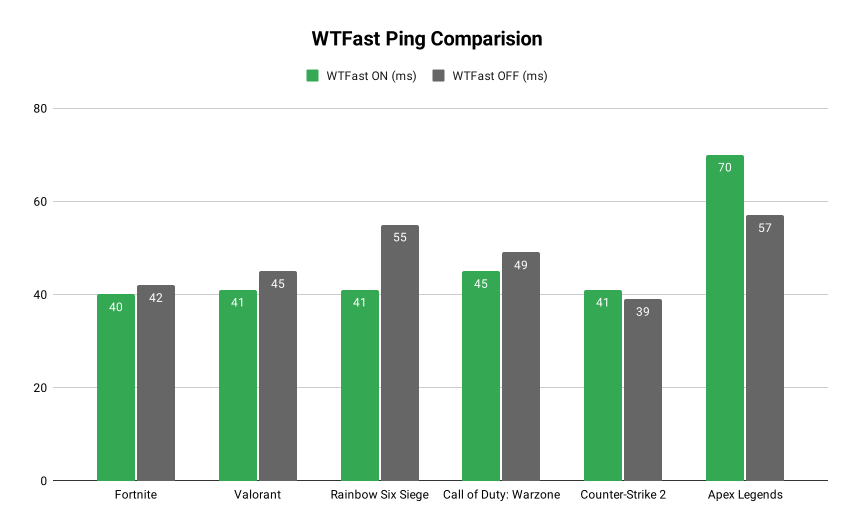 |
| Credits: Caio Vinícius The benchmark results demonstrate that WTFast is a specialized tool rather than a "one-size-fits-all" solution. The most significant performance gain was observed in Rainbow Six Siege, where latency dropped from 55ms to 41ms, a substantial 14ms improvement. Both Warzone and Valorant also saw consistent, albeit smaller, reductions of 4ms, which contribute to overall connection smoothness and frame-to-frame stability. However, the data also highlights the unpredictability of GPN routing. In Counter-Strike 2, we recorded a minor latency regression of 2ms. The most notable outlier was Apex Legends, where the ping increased from 57ms to 70ms (+13ms) with the software enabled. These variances suggest that while the WTFast private network can bypass congested ISP "highways," it may occasionally introduce an extra hop if the default ISP route to a specific game server is already highly optimized. Ultimately, the software excels at stabilizing jitter and preventing packet loss, which was a constant 0% across most successful tests, ensuring that even when ping isn't drastically lower, the "feel" of the game remains consistent. |
Stability and Resource Consumption

The software is highly optimized regarding resource consumption, using less than 1% of the processor and 98MB of RAM, both idle and in use. I didn't feel any increase in jitter; I felt more stability in the game, even though the nominal ping value didn't drop much, according to our tests.
Subscription Models and Cost-Benefit
WTFast offers three subscription tiers, all billed in US Dollars (USD). Choosing the ideal plan depends directly on your usage profile and how much you value competitive stability in your day-to-day life (prices updated as of February 2026).
- Monthly Plan ($13.37/month): Ideal for those who want to test the service for a longer period or need stability only for a specific game season.
- Quarterly Plan ($26.99 every 3 months): This is the best balance for most players. The monthly cost drops to $9.00, representing a 33% discount compared to the monthly plan. It is the smart choice for those who already have a defined gaming routine.
- Annual Plan ($79.99/year): The ultimate option for the hardcore gamer. Costing the equivalent of just $6.67 per month, you guarantee a 50% saving (half the price) compared to the monthly subscription. It's the plan with the best long-term financial return.
Value Verdict: WTFast's cost-benefit ratio is proportional to your technical demands. If you play casually, the monthly or quarterly plan works well.
But for those seeking maximum performance and wanting to save as much as possible, the annual plan is unbeatable.
Free Trial: If you still have doubts about whether the service will work on your route, the program offers a 3-day free trial. This allows you to replicate the latency tests I performed in this review in your own home before opening your wallet.
Important Note: To activate the 3 free days, you need to register a credit card. If the service does not meet your expectations, simply cancel it on the official website within 72 hours of registration to ensure no charges are made.
Pros and Cons
Strengths (Pros)
- Drastic Jitter Reduction: WTFast's biggest trump card is not just lowering ping, but "stabilizing the line." It eliminates those micro-fluctuations that make your character freeze or your shots not register.
- Telemetry-Rich Interface: Unlike competitors that act as a "black box," WTFast delivers detailed real-time graphs of connection flow, spikes, and health.
- Manual Customization (Custom Games): The ability to add any executable and manually choose the entry and exit servers is a massive advantage for less popular games or private servers.
- Proprietary GPN Infrastructure: By having a private network of servers dedicated solely to gaming, it suffers less from standard public internet congestion.
Weaknesses (Cons)
- Outdated Interface (UX/UI): Compared to more modern competitors like ExitLag or GearUP, WTFast's interface feels stuck in time. For the international user, the "2010s software" aesthetic gives the impression of a lack of updates.
- Console and Mobile Support: While some competitors have already integrated easy solutions for consoles (via router or DNS) and robust mobile apps, WTFast remains an experience focused almost exclusively on the PC (Windows), unless your router is natively compatible with WTFast.
- Restrictive Trial Process: Requiring a credit card for a mere 3-day trial is viewed very negatively in markets where a commitment-free "Free Trial" is the industry standard.
Final Thoughts
WTFast is not a universal solution, as its effectiveness varies significantly by game. In titles like Fortnite, Rainbow Six Siege, and Warzone, the software delivered clear benefits by reducing latency and ensuring a more stable connection.
However, the performance was inconsistent in Counter-Strike 2 due to occasional jitter, and Apex Legends performed worse than my standard connection, showing a 9ms ping increase and initial packet loss.
If you struggle with poor ISP routing, WTFast is worth testing because it uses virtually no system resources. Since results are title-specific, I recommend a trial run to see if it optimizes your favorite games.
If you want to test it yourself and see if it improves your routing, you can sign up for WTFast and support the blog.

Comments
Post a Comment